Did Reason Get Its Mojo Back? A Full Review of Reason 14
My name's Evan. I've been making music in Reason for over 20 years. And I have to be honest with you — over the last few years, I completely lost the inspiration to use it as my main DAW. The workflow kept getting in my way. I drifted to Logic, used that to put songs on TV and radio, and basically told myself I was done with Reason as a creative home.
So when Reason 14 was announced with major core updates to the DAW itself — not just new instruments or cosmetic changes — I leapt for joy. Because that part of Reason had been neglected by Reason Studios for so long. The question I came into this review to answer, for you and for myself, is simple:
"Did Reason get its mojo back with Reason 14?"
My short answer is: it absolutely did. I am having a lot of fun making music in Reason again. I'm feeling inspired. I'm following ideas down those nooks and crannies and just having a really good time with it — like I used to. And I hope maybe you will feel the same thing if you give Reason 14 a try.
✅ If you want to support the channel, this is an affiliate link below to purchase Reason 14. Send your receipt to stockmusician@gmail.com and I'll send you the free Reason 14 cheat sheet — a quick-reference guide to all the devices so you can get up and running as fast as possible.

|
QUICK VERDICT |
|
|
Reviewer |
Evan — 20+ years of Reason |
|
Version tested |
Reason 14 (full release) |
|
Overall rating |
⭐⭐⭐⭐⭐ Highly recommended |
|
Best for |
Home studio producers, Reason veterans, DAW switchers considering a return |
|
Skip if |
You only use Reason as a plugin inside another DAW |
|
Upgrade from 13? |
Yes — the workflow changes alone are worth it |
|
Try first? |
Reason+ free trial or one-month subscription |
Part 1: The New Reason 14 Workflow — This Is What Changed Everything
The biggest theme in Reason 14 is fewer clicks. Every new workflow feature traces back to the same goal: closing the gap between what you hear in your head and what makes it into the DAW. And by reducing the number of steps, the wrong turns, the moments of getting lost in the wiring — it really does make creating music feel engaging again in a way I hadn't felt in years.
The main sequencer window is now the home base for almost everything you'll do in Reason. Composition, sound selection, mixing — all from one screen. If you've been a long-time Reason user, you'll notice the interface has been cleaned up straight away: new icons along the top for browser, track panel, mixer, rack, and edit area. The transport at the bottom is tidier too. These sound like small changes but the cumulative effect is a DAW that just feels more intentional.
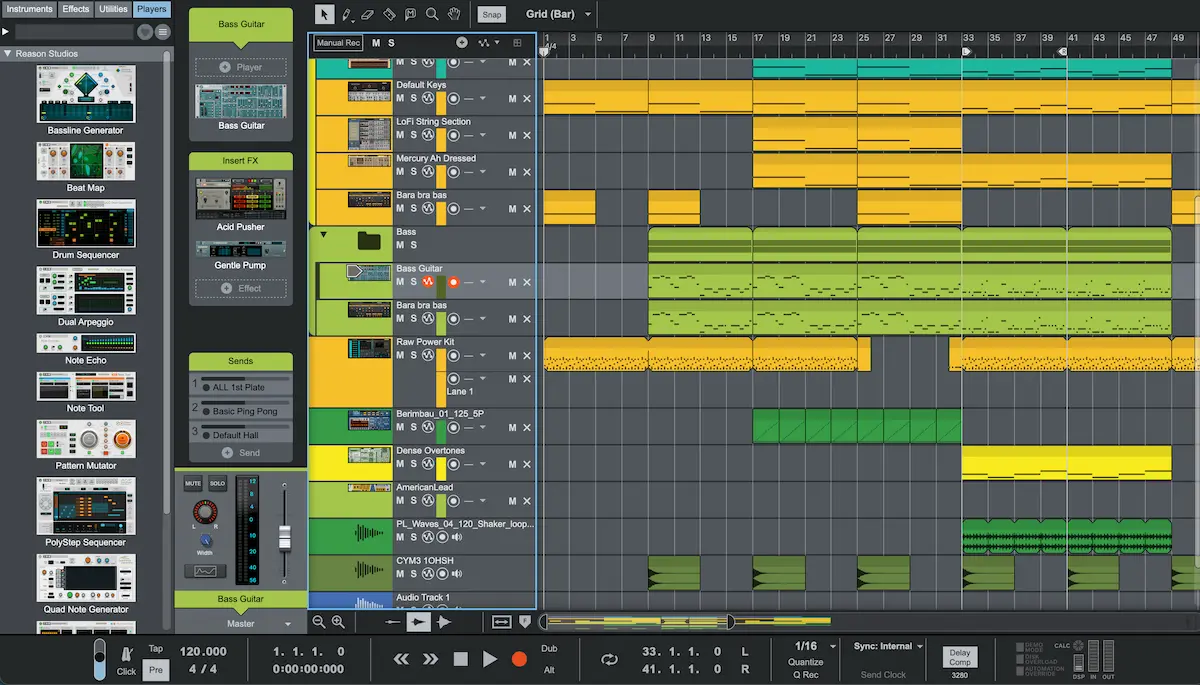
The track panel on the left lets you easily change devices, signal flow, and access key mixer controls.
The Track Panel — The Biggest Innovation in Reason 14
This is the one. If there's a single feature that made me excited to make music in Reason again, it's the Track Panel. Select any track in the sequencer, open the panel, and everything you need is right there — the instrument, the effects chain, sends, volume, monitoring, mute, solo, width. All of it. You never have to leave the sequencer view.
Here's a concrete example of how I used it: I had a Rex drum loop with an effect on it. I right-clicked and added an Audiomatic Retro Transformer, dialled it in to PVC. Then I sent it through a delay and a hall reverb — controlling the send amounts right there in the panel. Then added an EQ to cut some low end. All without leaving the sequencer. And then when I decided I actually wanted more distortion, I dragged an Osmium in, grabbed a quick patch — Shoe Gazer Dark — and was done. Every one of those steps that used to mean switching windows, scrolling the Rack, losing your place — gone.
And then I decided the effects were in the wrong order. No problem. In Reason 14, you can literally drag and drop the order of effects right there in the Track Panel. Reason auto-rewires everything for you by default. You can still do it the old-fashioned way by holding things down, and that's one of the things I love about how Reason 14 was designed: most changes are additional options, not replacements. You can use the new way, or you can keep working the old way. The choice is yours.
"I was able to reorganize effects, see what's going on in every track, adjust sends, adjust volume — all from one screen. This is so helpful as you're building out your tracks."
Single Column Mode — The Rack Finally Makes Sense
Tied to the Track Panel is the new Rack Per Track approach and, specifically, Single Column mode. When you open the rack from the Track Panel, you can hit the Single Column button and the entire rack for that track — the instrument, all its effects, all its players — stacks into one vertical column. No more scrolling horizontally across the whole rack trying to find which device belongs to which track.
Click a device, open it, make your change, close it. Then click to the next track. It's a completely different relationship with the Rack — instead of it being this sprawling parallel universe you have to navigate separately from your session, it becomes something you dip in and out of effortlessly. For anyone working on a laptop or a one-to-two screen setup, this is transformative.
It works especially well on a laptop. You can really see everything you need on one screen without jumping between windows. There's probably less of a gain for those with a three-screen setup — but for most people working on one or two screens, this is a lot better.
The rack still works exactly as it always has for people who want full multi-column mode, full CV routing, patch bay access — all of that is still there. Single column mode doesn't break any of that. It just means you don't have to start there.
Dark Mode
Yes, Reason 14 has full dark mode and yes, it looks gorgeous. The mixer in particular is striking — it genuinely looks like a high-end professional console software. In terms of new features for the mixer itself, nothing significant has changed this version. But dark mode makes long sessions noticeably more comfortable and gives the whole DAW a more premium feel.
Part 2: The RV-9 Reverb Station — A Lot More Than a Reverb
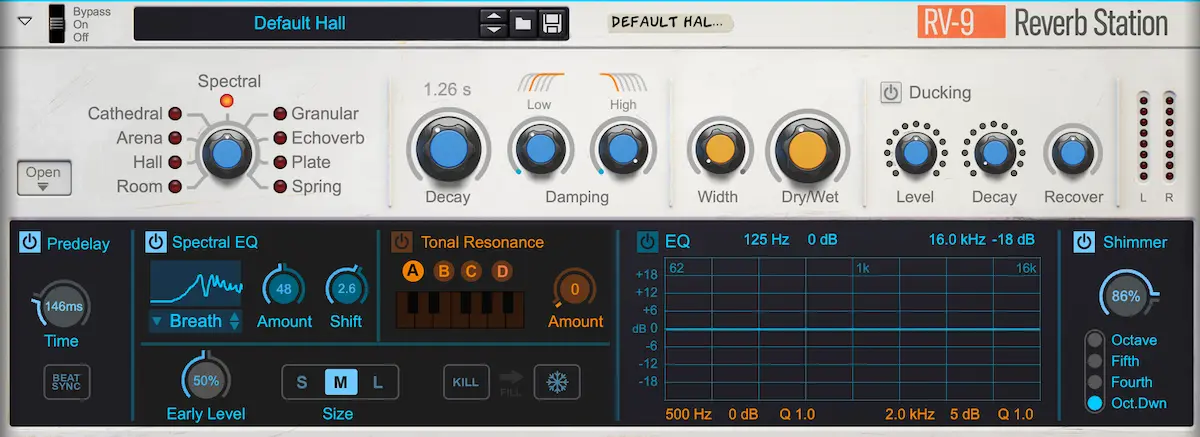
The RV-9 is Reason 14's new flagship reverb, and calling it just a reverb undersells it. It's a creative tool. Here's what you get.
Nine Algorithms
The RV-9 ships with nine reverb modes, all of which are generally higher quality than what you'd get from the old RV7000:
- Cathedral
- Arena
- Hall
- Room
- Plate
- Spring
- Spectral
- Granular
- Echo Verb
The first six cover the traditional spaces — the last three are where things get interesting for sound design and texture work.
The Controls
To the right of the algorithm selector you have the high-level controls: Decay (which varies by algorithm), a damping control, Width (from mono to full stereo), and Dry/Wet. Then there's built-in Ducking — and this is a nice touch — which you can use either to turn down the overall reverb volume, or to shorten the decay when there's a lot of signal and lengthen it when the signal drops. It's a very natural-sounding dynamic reverb behaviour that you don't often find built-in like this.
Each of the nine algorithms also has its own unique sub-controls when you open it up, plus a pre-delay (with sync option), a dedicated EQ for the reverb tail, and a Shimmer reverb option that adds pitch-shifted harmonic content — octave up, fifth up, fourth up, or an octave down.
How It Sounds in Practice
I put it on a vocal pad track in one of my session using the Spectral mode. Even before I started tweaking it, the reverb was doing a lot of heavy lifting — a long, slowly fading decay that pushed the pad back into the mix in a way that felt organic rather than processed. With the shimmer added underneath in the octave-down setting, it filled in the low-frequency space around the sound in a way I hadn't heard from any of Reason's built-in reverbs before.
I also used the Echo Verb algorithm on a whoosh/transition effect. Without it, the sound was a harsh, hard-hitting echo. Through the Echo Verb, it became something with genuine space and dimension — it pushed the element back into the mix naturally and added a rhythmic quality that the delay could then pick up on. In the context of the full mix, it just worked.
I think this is a wonderful new creative tool. It has quickly become one of my go-to reverbs because it's really easy to dial in a desirable sound. And there is just an insane range of creative potential with this, especially once you start using CV to automate key parameters or build a Combinator around it.
For the adventurous: the RV-9 also responds to CV modulation, and building a Combinator patch around it to automate parameters that aren't immediately exposed on the front panel opens up a whole new layer of control. Future deep-dive video incoming on exactly that.
Part 3: Sequencer Improvements — The Details That Add Up
The workflow changes and the RV-9 are the headline features, but Reason 14 also ships with a set of sequencer and editor improvements that collectively represent a meaningful quality-of-life upgrade for day-to-day composition. These are the things you might not notice individually — but combined, they make every session faster.
Track Folders
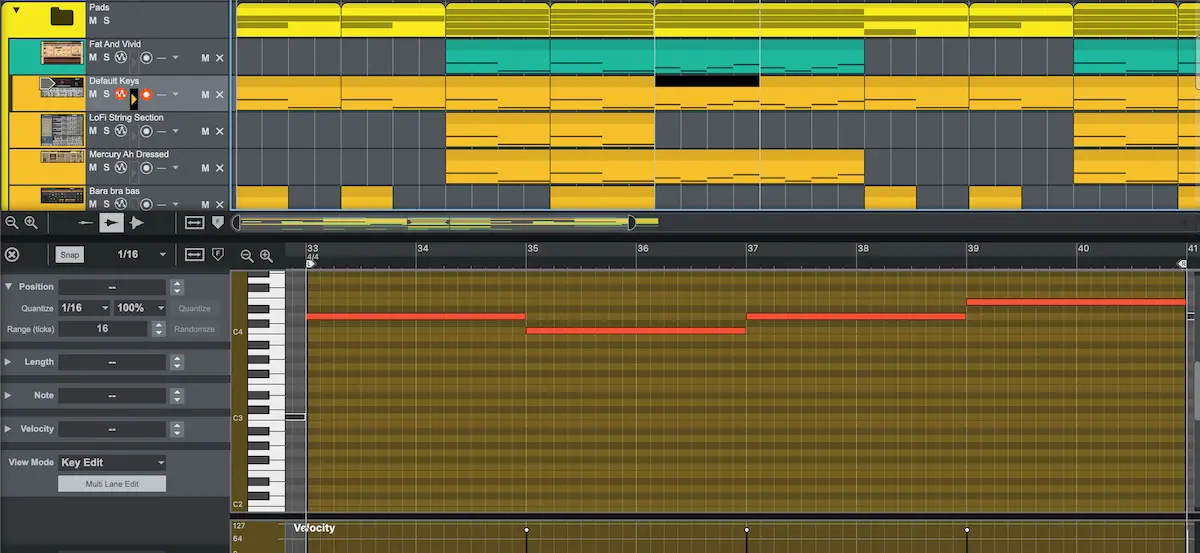
Track Folders are exactly what they sound like and they're exactly what Reason needed. You can now group related tracks into a folder — all your pads, all your drums, all your strings — and collapse the whole group to a single row. The folder shows a composite view of what's happening underneath, and you can solo or mute the entire group from the folder level without having to touch individual tracks.
You can also nest folders inside folders, up to three layers deep. And you can colour-code folders independently from the tracks inside them. These are the kinds of organisational tools that have existed in other DAWs for years — it's very welcome to have them in Reason now.
The Improved Loop and Clip System
This one changed how I actually write. Previously, to duplicate or extend a pattern, you had to copy and paste manually. Now you can simply grab the right edge of any clip and drag it — Reason creates copies of the original automatically. For repetitive track-building (which is basically all of electronic music), this is a significant time saver.
The more powerful version of this is what happens when you want to create a variation. You can literally draw a new MIDI passage over the top of a looped section and it writes in as an independent variation for that moment, without breaking the loop underneath. So your main pattern keeps repeating and your fill or variation drops in exactly where you place it, then the loop continues.
Automation works the same way — draw an automation curve once and it applies to every instance of that looped clip as if it were a handwritten LFO.
Three New Playback Options Worth Knowing
These three settings are buried in the options menu but they're some of the most practically useful changes in the update:
- Trigger notes while editing: You can now toggle whether notes play back when you add or move them in the piano roll. With a short synth this is helpful. With a long sample or pad, having it fully play out every time you touch a note is maddening. This simple toggle prevents a lot of frustration.
- Transport return behaviour: You can now choose whether the playhead returns to the last stop position or stays where you left off when you hit play again. This sounds minor until you realize how often you stop on bar 7 and want to keep working from bar 7 — and Reason keeps bouncing you back to bar 1.
- Chase notes during playback: This is a big one. Previously, if you started playback in the middle of a long sustained note or pad, Reason would only trigger a note if the playhead caught the beginning of it. So long pads or long samples simply wouldn't play if you started partway through — you had to scrub back to the start of the note. Now Reason triggers the note at the playhead position as if it had started at the beginning. About 90% of the time this is exactly what you want, and it means you can punch in accurately, hear context immediately, and stop re-listening to the same eight bars just to hear what comes after.
Velocity Editing — Finally Easier
A small but meaningful change: each note in the piano roll now has a handle at the top of its velocity bar. Instead of having to carefully click and drag the exact top of a tiny velocity bar — which often resulted in accidentally drawing in extra notes — you can grab the handle cleanly. They've also fixed the behaviour when you draw a note over an existing one: it now functions as an erase rather than creating a hidden stacked note underneath. Anyone who's spent time debugging Reason sessions trying to find phantom notes will understand why this matters.
"Everything behaves more the way you would expect it to, in a way that requires fewer clicks to get a predictable result. That's the overall way I would describe Reason 14."
Final Verdict: Should You Upgrade to Reason 14?
Yes. For almost everybody, the answer is a resounding yes.
The workflow improvements in Reason 14 are so fundamental to the DAW that even if you're on Reason 13, I think you should upgrade. Not because of the new sounds or the new reverb — because the way the software works has genuinely changed. I didn't feel this way about previous updates. This is up there with one of the most important updates Reason has made in a long time.
The one exception: if you only use Reason as a plugin inside another DAW and never open it as a standalone, I don't think they added enough value specifically for you this version. The workflow improvements are about the standalone experience.
But if you're someone who used to love Reason and got so frustrated with it that you moved to another DAW — whether that's Logic, Ableton, FL, or anything else — I think you should come back and take another look. The most cost-effective way to do that is a one-month Reason+ trial. See if it speaks to you again. If it does, then decide between a perpetual licence or keeping Reason+.
It is not the most powerful do-everything DAW out there. But for a home studio producer who does everything in the box, one or two people recording, one or two screens — Reason 14 is now one of my most enjoyable DAW experiences. And it really recaptures that feeling of creativity I had back when I was first messing around with Reason 2.5, so many years ago.
Reminder: If you want to support the channel, this is an affiliate link below to purchase Reason 14. Send your receipt to stockmusician@gmail.com and I'll send you the free Reason 14 cheat sheet — a quick-reference guide to all the devices so you can get up and running as fast as possible.
From a Frustrated Producer in a Ragtag Bedroom Studio to Major Placements on TV Earning $1,000s!
My name is Evan, and I've been making music since around 3rd grade. I'm from San Diego, California, but I've lived in Washington, DC for the last 20 years.
While I still have a full-time day job, I have created systems that have allowed me to produce dozens of songs a year in my spare time.
My songs have been on Netflix, TV shows like the 90 Day Fiance, an award-winning indie film, and NPR’s “All Thing Considered.” They've also been streamed millions of times.
In addition to being a music producer, I am passionate about teaching people how they can make professional-sounding music and earn money licensing it, all in their spare time.
Thousands of musicians, like yourself, have trusted me to guide their musical journey. My YouTube videos have been watched nearly a million times. And my story has been in Forbes, Side Hustle Nation, and the Side Hustle School.


EQ is the most essential tool you have for making music sound clean, clear, and professional. In this book you'll learn how to use the R.O.S.E. System, a simple 4-step EQ formula to help you master the world of EQ
